Local AI for Business: The Models, the Self-Hosting and What the Install Involves
"Local AI" gets searched by two kinds of people: the owner who wants the client files kept in the building, and the technical person who's been asked to make that happen. This page is for both.
€600 per month for the software and the hardware rental. You rent the machine — you don’t buy it.
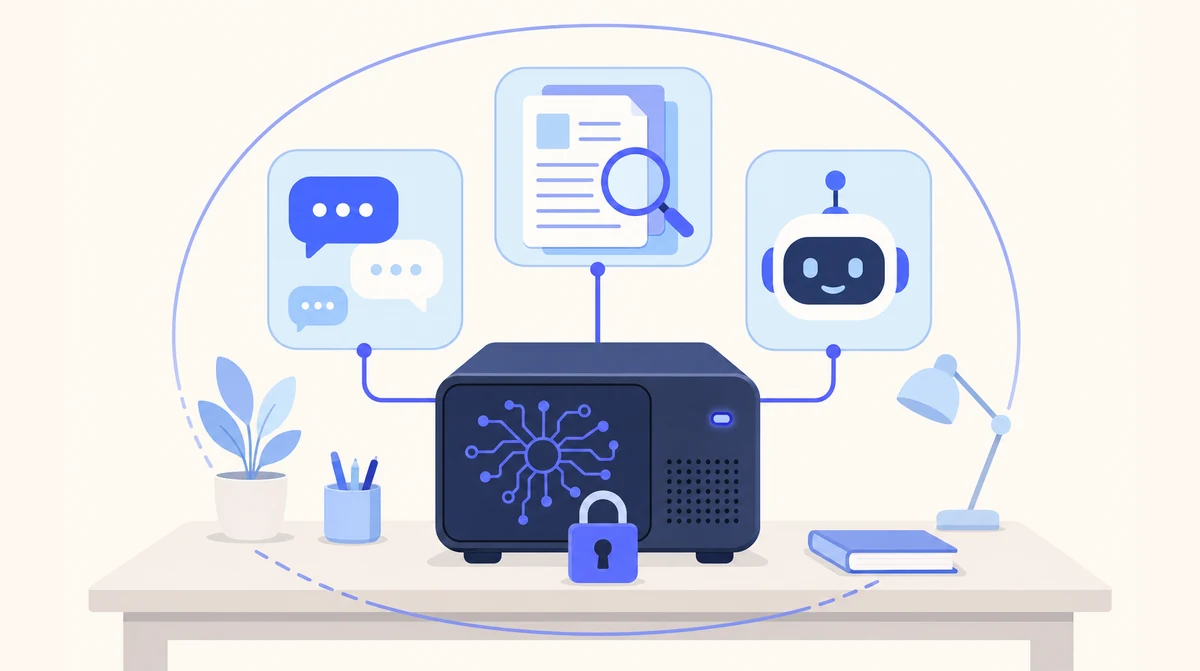
Local AI is AI software — chat, document search, assistants — running on a machine in your own office instead of a provider's cloud. It uses open-weight models, published so anyone can host them. AgentHub picks the models, supplies and installs the machine in your office, connects your sign-in and supports it, so an Irish business gets self-hosted AI without the DIY.
Book a Local AI Consultation
€600/month, hardware rental included · Irish, PhD-led team · Hardware, setup and support in one arrangement
This is the buyer's view of Local AI, our on-premise product. The product page has the full feature list and GDPR breakdown; this page answers the questions people search first.
What "Local AI" Means, and What It Doesn't
Local AI means the AI runs on hardware in your building: the question, the document and the answer never leave your network. It doesn't mean a weaker product — staff get the same kind of chat window, document search and assistants they'd get from a cloud tool. And it doesn't mean "the AI features inside your cloud office suite" — those run on the suite provider's servers, which is the opposite of local.
In Ireland the same idea usually gets called on-premise AI, or on-premises if you're being precise. Same thing: one machine, your network, your files. What differs between offerings is who chooses the models, who does the install, and who is still there in month six. That's the part worth reading closely.
What Local AI Models Actually Do for a 20-Person Business
Three tools, one machine. Sign-in through the Microsoft 365 or Google Workspace accounts your staff already have.
Private Chat
A ChatGPT-style assistant on your own hardware. Draft, summarise, rewrite, ask questions about an uploaded file — the conversation is stored on the box, and only there.
Document Spaces
Point it at a folder. Search, compare and summarise across hundreds of documents, with a citation back to the page each answer came from.
AI Assistants
Custom automations for the recurring jobs — a monthly report, a standard memo, a checklist someone runs by hand — built on the same machine and covered by the same support.
Local AI Models: What They Do Well, and Where the Cloud Still Wins
We sell both, so there's no reason to oversell either.
| The job | Local AI models on your machine | The largest cloud models |
|---|---|---|
| Summarising a 60-page document | Very capable — this is the everyday use | Capable, but the document goes to the provider |
| Drafting letters, memos, replies | Very capable, in your own tone once shown examples | Very capable |
| Extracting figures and dates from files | Very capable, with citations back to the page | Capable |
| Searching across hundreds of your documents | Built in — the index lives on the box | One upload at a time, into the provider's storage |
| Hard, novel reasoning problems | Behind the frontier — we'll say so | Still ahead |
| Speed | Somewhat slower than the big cloud services | Fastest |
| Where the data goes | Nowhere — it stays in your building | The provider's servers, usually outside Ireland |
| Works if the internet drops | Yes — only sign-in needs the line | No |
The trade is a little capability and speed for your data never leaving the building. For the contracts folder, the client accounts and the personnel files, most Irish firms take that trade happily. For the phone line and the info@ inbox, where no confidential documents are involved, our cloud AI receptionist and email manager are the better tools — and many clients run both.
Self-Hosted AI: Do It Yourself, or Have It Done?
Self-hosted AI means you run the models on hardware you control rather than renting them from a provider. Anyone can, technically: download an open-weight model, run it on a laptop, chat by the evening. Turning that into something a 20-person firm relies on daily — several users, document search, access control, backups, upgrades — is the job we do.
| Step | Self-host it yourself | AgentHub Local AI |
|---|---|---|
| Picking the models | Hundreds of options that change monthly | Chosen for your jobs and hardware, tested on your own files, re-picked as models improve |
| The hardware | Research, buy, discover the card is too small | Sized after a short call, supplied configured |
| Serving a team | A laptop model serves one person | Built for the team size, reached through the browser |
| Documents | A second project on top of the first | Spaces with page-level citations, included |
| Who can see what | Usually nobody thought about it | Single sign-on with Microsoft 365 or Google Workspace |
| Updates and backups | When someone remembers | Ours, on an agreed schedule; restore to a replacement machine on failure |
| Month six | A forum thread | The people who installed it |
If you're the technical person who was handed this, our local LLM page covers how we choose models and our AI server page covers the box itself. If you're the owner who wants the files kept in the building, the private AI page is the one to send around.
Open-Source AI Models and Local Hosting: Why It's Possible at All
Local AI exists because some model makers publish their models' weights — the trained model itself — so anyone can download and host them. People call these open-source AI models; the more careful term is open-weight, because the licence sometimes limits commercial use even though the download is free. We check the licence before we deploy anything for you, and we'll tell you which family of models your machine is running.
The useful consequence for your business: the models arrive trained and stay that way. Your documents are never used to train them — ours or anyone else's. When a better open-weight model is released, which happens every few months, we test it against your baseline and upgrade you as part of the support arrangement. No re-buy, no re-project.
What an On-Premise Local AI Install Involves
Scope and Size
A short call: which team, which folder, how many people. We pick the models and size the machine from that.
Install on Your Network
The configured machine arrives, goes on your network, sign-in is connected to your Microsoft 365 or Google Workspace, and your existing documents are imported into spaces.
Train, Go Live, Keep It Current
We train the team. Updates, model upgrades, backups and support are ours — the people who installed it are the people you ring.
Hardware, Setup and Support: What the Arrangement Covers
One arrangement: €600 per month for the software and the hardware rental — the machine is rented, not sold.
| Part | What you get | What isn't part of it |
|---|---|---|
| Hardware | A dedicated machine sized for your team, supplied, configured and installed | No component shopping; a port, a socket and a place to sit is all we need |
| Models | Open-weight models chosen for your jobs, licence-checked, tested on your files | No per-token or per-user fees — 50 questions or 5,000 cost the same |
| Setup | Network install, single sign-on, document import, training | No discovery workshop before something works |
| Ongoing | Software updates, model upgrades, backups, support from the installers | No patch cycle landing on your IT person |
| Data | Stays on the box; never used for training; restorable to a replacement machine | No copy held by us or by an AI provider |
| Custom assistants | Scoped with you, built on the same machine, covered by support | Not bespoke machine-learning research |
What Clients Say About Working With Us
Since installing AgentHub's AI receptionist, we haven't missed a single patient call. It handles appointment queries after hours and our front desk staff can focus on in-clinic care.
Our inbox was drowning us. AgentHub's email manager now categorises everything and drafts responses that sound exactly like us. Response times went from 48 hours to under 4.
An Irish Team That Hosts Its Own Models
Built in Ireland
An Irish company installing machines in Irish offices. The installer and the support line are the same people — see who we are.
PhD-Led Team
Founded by a Computer Science PhD with 27+ years in software, including 15 years at IBM Ireland.
Security First
Co-founded by a Security Architect. Your own sign-in, no inbound ports, and a data processing agreement for the support access you grant.
Models Kept Current
Open-weight models improve every few months. We test the new one against your baseline and upgrade you as part of support.
Local AI: Your Questions Answered
What is local AI?
Local AI is AI software — chat, document search, assistants — running on a machine in your own office instead of a provider's cloud. Your questions, documents and answers stay on your network. It's made possible by open-weight models, which are published so anyone can host them on their own hardware.
Are local AI models as good as ChatGPT?
For business tasks — summarising, drafting, extracting, answering questions about your own documents — very capable, and somewhat slower than the large cloud services. For frontier reasoning on hard, novel problems the biggest cloud models are still ahead. The trade is a little capability for your data never leaving the building.
What does self-hosted AI mean?
Running the AI models on hardware you control rather than renting them from a provider. You can do it yourself with a downloaded model and a laptop, or have it done: a machine sized for the team, document search, sign-in, backups and upgrades handled by us. Both are self-hosted; only one still works in month six.
Can I host open-source AI models locally for commercial use?
Usually, but check the licence — the download is free, and some open-weight licences still restrict commercial use. We check the licence of every model before we deploy it for you and tell you which family your machine is running. Your documents are never used to train the models.
Is local AI the same as on-premise AI?
Yes. On-premise (or on-premises) AI is the term Irish IT people tend to use; local AI is what owners search for. Both mean one machine on your own network running the models, with nothing sent to a cloud AI provider. Our product for it is called Local AI.
How much does local AI cost?
€600 per month for the software and the hardware rental. The dedicated machine is rented to your business, not sold: you never buy the hardware. It is installed in your building and runs the private chat, document spaces and assistants. There are no per-token or per-user fees for the models themselves. Local AI is for business customers only.
Ready to Bring AI In-House?
Tell us what you'd want it reading and who would use it. We'll tell you which models, what machine, and whether local is the right call at all.
Prefer to talk? Email sghaith@agenthub.ie or call 087 788 2676.